
Kre8or is an AI image generation platform that allows anyone to create high-quality visuals. It’s beginner-friendly, flexible, and doesn’t require any design experience.
Many people don’t know what Kre8or can do or how to use all of its features. It’s not a complicated platform, but having a complete guide to follow makes it much easier to learn how everything works.
In this complete guide to Kre8or, I’ll walk you through what the platform is, how its features work, and whether it’s worth using.
By the end, you’ll have a clear understanding of Kre8or and everything it has to offer, and you’ll be able to start creating your own designs right away.
If you’d like my personal thoughts, pros and cons, and overall recommendation, read my full Kre8or review.
TLDR
Kre8or is a fun and accessible platform for anyone interested in AI image creation.
- Kre8or is an AI image generation platform that lets anyone create high‑quality visuals without needing design experience.
- It’s beginner‑friendly, flexible, and ideal for experimenting with image creation at your own pace.
- You can create almost any image you can imagine, for both personal and professional use.
- Kre8or offers fast generation, a strong community, multiple earning methods, flexible pricing, and a wide range of features.
- The affiliate program pays 10% commissions on upgraded memberships for as long as your referrals remain active.
- To get started, sign up for a free membership, set up your profile, and begin creating.
Whether you’re a beginner or an experienced creator, Kre8or gives you the tools to express yourself, grow your skills, and earn from your creativity.
Affiliate Disclosure: This post contains affiliate links including Kre8or affiliate links meaning if you sign up for anything using the links on this page I may earn a small commission at no extra cost to you. I only recommend platforms that I genuinely believe will benefit you and suit your needs.
- TLDR
- What Is Kre8or?
- Who Is Kre8or Best For?
- What Can You Create With Kre8or?
- How Kre8or Works
- Kre8or Dashboard Overview
- Image Generation
- Tips For Better Results
- Remix System & Earnings
- Challenges
- Community & Social Features
- Affiliate Program
- Kre8or Pricing
- Is Kre8or Worth Joining?
- Conclusion
- Frequently Asked Questions
What Is Kre8or?
Kre8or is a visual creation platform that lets anyone create high-quality images quickly and easily.
It can be used to create any kind of image or graphic you need, including logos, product images, infographics, digital art, and more.
Kre8or makes image creation simple, fast, and accessible. You can share your work with the community, interact with other members, and even earn from remixes on your creations.
The platform is designed for beginners, hobbyists, business owners, content creators, and anyone who needs images for personal or professional use.
There’s almost nothing you can’t create with Kre8or, and my early experience as a beta tester has shown me just how powerful the platform really is.
You don’t need any design skills to use Kre8or. All you need is an idea and your imagination.
Now that you know what Kre8or is, let’s take a look at who it’s best for.
Who Is Kre8or Best For?
Kre8or is best for beginners who want to try out image generation and experiment without pressure.
It’s ideal for creators, designers, hobbyists, artists, and anyone who wants to create images regularly.
It’s also a great choice for business owners, marketers, content creators, power users, teams, and studios who want to earn from their work, and grow their business.
However, Kre8or is not the right fit for anyone who doesn’t want to create images, those looking for fast money, or anyone who doesn’t enjoy designing.
If you want to be successful with image creation, you need to enjoy the process and be patient. If that’s not you, then Kre8or isn’t the right platform for you.
Overall, if you enjoy creating images, experimenting with ideas, or want a platform that rewards creativity, Kre8or is a great option for you.
What Can You Create With Kre8or?
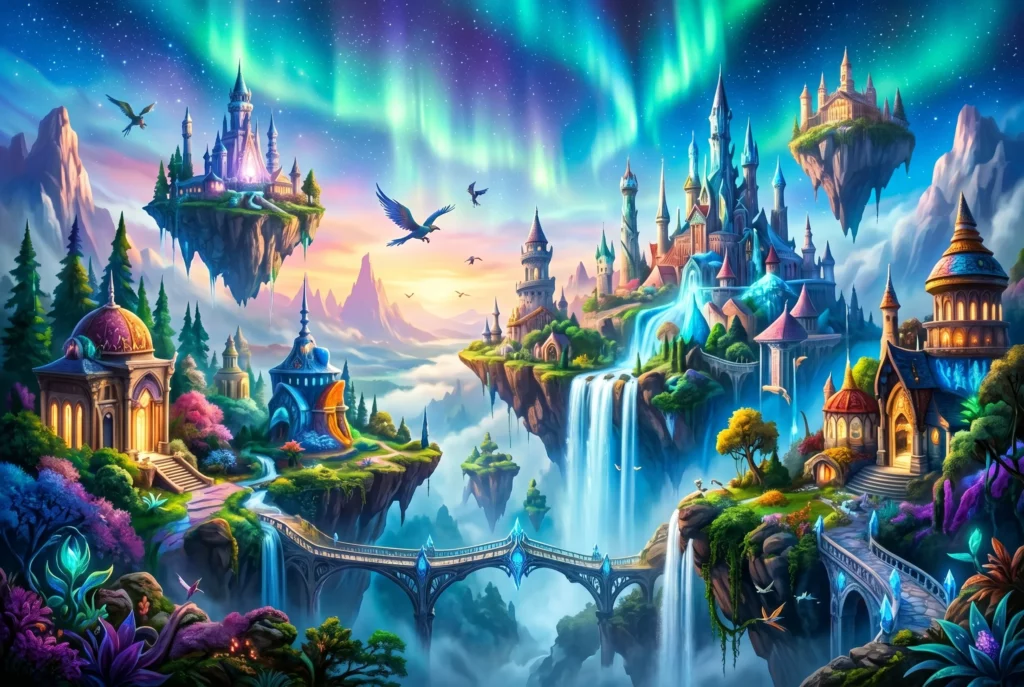
On Kre8or, you can create just about any image you can imagine. It’s flexible enough for both personal and professional use.
Whether you need something artistic, realistic, stylised, or completely unique, Kre8or can do it all.
All you need is an idea, and the platform gives you the tools to bring it to life.
Here are some examples of images you can create on Kre8or:
- Logos & brand kits
- Product images
- Portraits & characters
- Social media graphics
- Niche-related infographics
- Fantasy & sci‑fi art
- Landscapes & environments
- Digital art & illustrations
There’s nothing you can’t do with Kre8or. It’s not limited to templates or restricted to certain categories.
If you can describe your idea, you can design it with Kre8or.
If you’d like to see real examples, here’s my listicle of ideas on what you can create with Kre8or.
Now that you know what’s possible, let’s take a look at how Kre8or works so you can get an idea of what it’s all about.
How Kre8or Works
Kre8or is a powerful platform with a wide range of useful features. When you log in, you’re taken straight to the dashboard where you can access everything you need.
From the dashboard, you can view your creations, browse the social feed, remix images, access your profile, participate in challenges, and much more,
Creating an image is simple. Click the Create button, type your prompt, choose your size and style, and generate your image. You can refine your creation anytime by regenerating or editing it.
You can also remix other members’ images, and they can remix yours. Each time someone remixes one of your creations, you earn a small amount of credits and cash. It’s a fun way to experiment and earn at the same time.
Kre8or also runs live challenges each week. You can submit 3 to 5 entries per challenge and earn credits and cash through participating, winning, and voting.
Challenges are one of the most enjoyable parts of the platform and help keep the community active.
Overall, Kre8or offers a wide range of features and a vibrant community to go with it. It enables anyone to create stunning images regardless of their design experience.
Now that you understand how Kre8or works, let’s take a look at everything you’ll find on the dashboard so you can navigate the platform with ease.
Kre8or Dashboard Overview
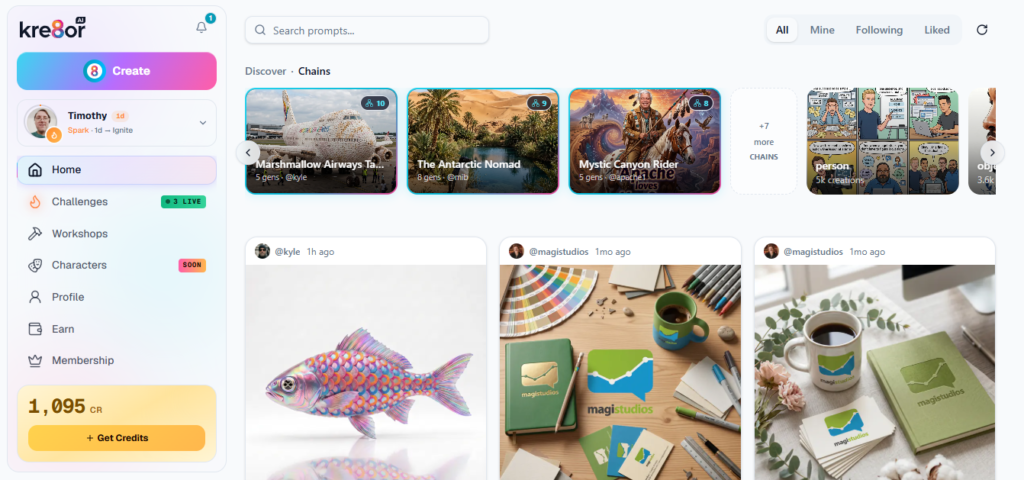
The Kre8or dashboard keeps everything in one place, but it can be a bit confusing the first time you see it.
Each time you log in, you’re taken straight to the dashboard where you can access everything you need.
From here, you can view your creations, browse the social feed, remix images, check your notifications, update your profile, participate in challenges, and much more,
Here’s an overview of how the Kre8or dashboard works:
Social Feed
Kre8or has a live social feed that is visible on the dashboard at all times. It shows new creations from members in real time.
On the social feed, you can:
- View creations
- Like and comment on creations
- Remix any images you want
The feed is great for inspiration, helps you discover new styles, and makes it easy to connect with other members.
You don’t need to interact with everything, it’s simply there to keep you updated and spark ideas.
Notifications & Updates
The notification icon is located at the top left corner of the dashboard. When you click it, you’ll see a small menu of recent updates.
Notifications include:
- Likes and comments on your images
- Reactions to your interactions
- Remixes of your creations
- System updates
They help you stay informed and track your activity on the platform. You may also receive email notifications occasionally, but most updates appear inside Kre8or.
You can click the bell icon anytime to see what’s new.
Profile & Settings
Your profile is where you set up your identity on Kre8or. It helps others find you, recognize your work, and connect with you.
On your profile, you can:
- Set your username and handle
- Write a bio
- Upload a profile picture and banner
- View all your creations
- Check your performance statistics
A complete profile builds trust and increases engagement. It only takes a few minutes to set up, and it’s something all new members should do.
You don’t need a perfect profile, just choose a handle, add a photo, and write a short bio.
Search Feature
Kre8or has a search feature you can access by clicking the magnifying glass icon at the top of your dashboard.
The search tool allows you to find:
- Members
- Prompts
- Styles
- Creations
It saves time and helps you find inspiration quickly. If you’re looking for a specific creator, style, or idea, just type it into the search bar.
Earnings
You can see your credit balance on the bottom left-hand side of the dashboard at any time.
On the Earn page, you’ll find:
- A detailed breakdown of all credits and cash you’ve earned
- How much you earned and where it came from
- Your affiliate link and stats
- Payout options and cashout settings
This page gives you a complete overview of your earnings and affiliate activity.
Membership
The Membership page is where you manage your Kre8or plan.
Here, you can:
- View your credit balance
- Check your storage usage
- See your current plan
- Manage your subscription
- Update billing
- Purchase credits
- Buy extra storage
- Compare plans
At the bottom of the page, you’ll also find an FAQ and an email address for support if you need help.
Your Central Hub
The Kre8or dashboard acts as your central hub. It connects everything together and gives you access to every part of the platform in one place.
Once you understand how it works and what each section does, it becomes easy to find what you’re looking for.
Checking your dashboard regularly ensures you never miss updates, remixes, or challenge activity.
Now that you have seen how the Kre8or dashboard works and where everything is, let’s take a look at image generation so you can understand how creating images works on the platform.
Image Generation
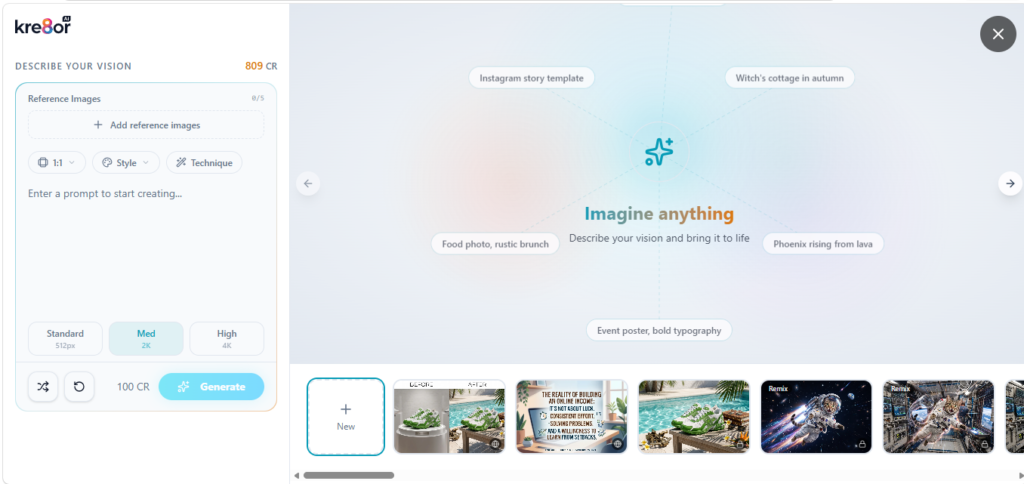
The image generator is the primary feature of Kre8or. It allows you to create any kind of image you can imagine.
Images are generated using a prompt. You simply describe what you need, the colours you want, and anything you want included in your image.
You can also add reference images and configure the size, style, and technique.
Once you’re ready, your image will be generated in around 30 seconds.
Images can be edited anytime, but each edit, change, or adjustment will cost additional credits.
You can keep your images private, share them publicly on the Kre8or platform, or download them to use anywhere online.
Upgraded members have commercial rights to all their images, meaning you’re free to use them however you like.
Image Credits
Images are generated using credits and every image you create will cost credits.
The number of credits used depends on the image quality you select:
- Standard: 75 credits
- Medium: 100 credits
- High: 200 credits
So, for example, 10 medium quality images would cost 1000 credits.
Image quality differs based on your selection:
- Standard: 512px
- Medium: 2K
- High: 4K
All three quality levels look professional, so choose based on your needs and budget.
Credits are included each month in upgraded memberships, and extra credits can be purchased anytime.
Workshops
Workshops allow you to experiment with a range of different techniques. You can create brand kit scenes, product before-and-after visuals, cyberpunk avatars, and much more.
There are dozens of workshops to choose from, and many of them are fun to play around with.
You’ll find workshops like:
- Cabinet colour refresh
- Day to twilight exterior
- Seasonal product campaign
- Room aesthetic makeover
- Culinary editorial shot
- Executive portrait studio
There are more than 100 workshops to choose from, and you’ll find something for just about any occasion.
To use a workshop:
- Select the workshop you want
- Upload an image
- Choose a style if applicable
- Click Generate.
About 30 seconds later, your image will be complete.
Workshops are a powerful and enjoyable feature, and you can create some truly unique and creative designs.
Now that you understand how image generation works, let’s go over some tips you can use to get better results with your creations.
Tips For Better Results
When you’re creating images, it’s normal to feel stuck or unsure how to make your designs really stand out.
But there are simple ways to improve your work and get it closer to what you want.
Here are some easy tips to help your creations shine:
- Be specific with your prompt
Describe colours, lighting, mood, and details to help Kre8or understand what you want. - Use reference images when possible
They help guide the style, pose, or layout more accurately. - Choose the right quality level
Standard is great for testing, Medium for most images, High for final designs. - Start simple, then refine
Generate a basic version first, then adjust your prompt or settings. - Use Workshops for complex scenes
They handle transformations, makeovers, and product visuals more reliably. - Avoid overly long prompts
Short, clear prompts often produce better results than long paragraphs. - Experiment with different styles
Changing the style can dramatically improve the final image. - Regenerate if needed
Sometimes the second or third generation is the best one. - Save your favourite prompts
Reusing strong prompts helps you build consistency in your creations. - Don’t be afraid to remix
Remixing your own images can lead to unexpected and creative results.
With Kre8or, you have the power to create anything you can imagine. Don’t be afraid to get creative. Use whatever ideas you have and bring them to life.
Now that you know how to get better results, let’s explore the remix system and earnings so you can see how you can earn from your creations on Kre8or.
Remix System & Earnings
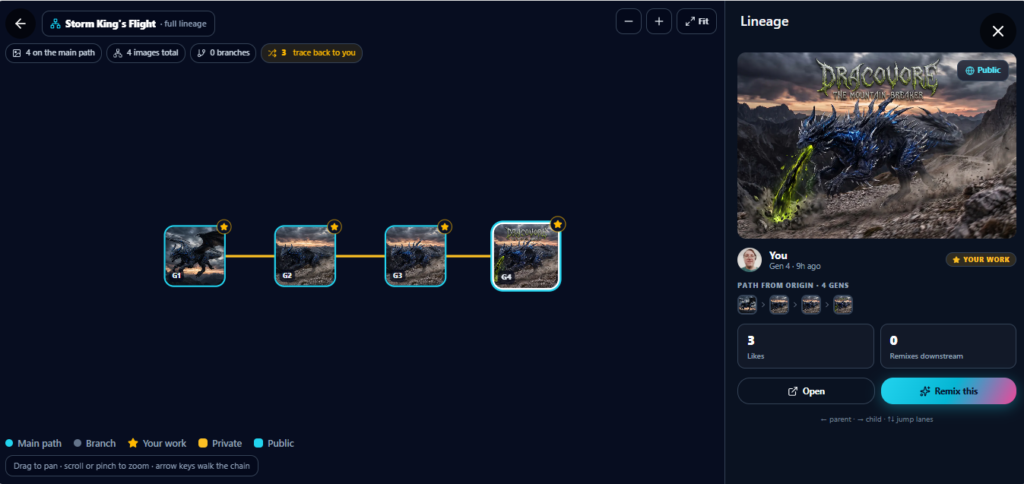
Kre8or has a remix system that allows you to earn from remixes on your images. A remix is when another user creates their own version of one of your creations.
They can make any changes they like, but your original image always remains intact.
You can also remix other members’ images and create your own variations.
Remixing is one of the core features of Kre8or and plays a big role in creativity, engagement, and earnings across the platform.
How To Remix An Image
Remixing an image is simple and can be done anytime you like.
To remix an image:
- Find a creation you want to remix.
- Click the Remix icon.
- Describe the changes you want to make.
- Configure the size, style, and technique.
- Click Create
Once your remix is complete, you can publish it on Kre8or. You can remix an image as many times as you want, as long as you have enough credits.
Every remix creates a chain that displays all variations made from the original image. These chains can grow indefinitely, allowing images to evolve over time.
Earning From Remixing
For each remix created from one of your images, you earn 5 credits and $0.02. If you remix another member’s image, they earn that amount instead.
These earnings are added instantly, no matter how many times your image is remixed. Each of your creations can pay you an unlimited number of times, and you can view all your remix earnings on the Earn page anytime.
If your creations are high‑quality and visually appealing, you can earn a steady stream of extra credits and cash simply by having them published on the platform.
The Importance Of Remixing
Remixing increases the visibility of your images and encourages engagement. It helps images evolve, allows anyone to transform existing work, and keeps the creative ecosystem active.
It also strengthens community interaction, giving members a way to support each other’s creations.
Remixing is one of Kre8or’s most powerful features, and everyone should take advantage of it.
Let Your Creativity Shine
Remixing is a lot of fun, and you should let your creativity shine. Use clear prompts, choose images that are already performing well, and remix consistently to build momentum.
You never know what might happen. A single remix chain can take off and generate ongoing earnings. Most importantly, enjoy the process. Remixing is meant to be fun, expressive, and rewarding.
Remixing is one of Kre8or’s best features, and anyone who uses it will benefit from it. It’s a great way to get creative and boost your earnings at the same time.
Now that you understand how the remix system works, let’s take a look at Challenges so you can see how to take your creativity to the next level.
Challenges
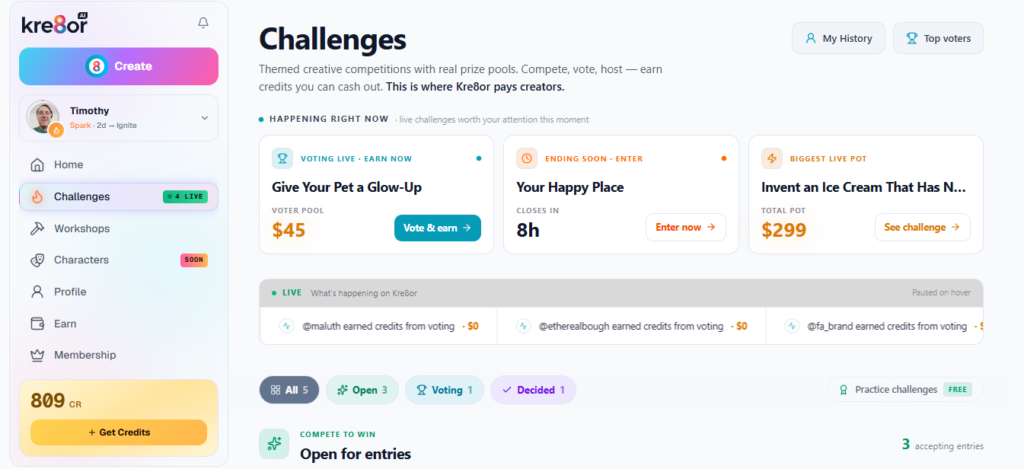
Kre8or runs live challenges each week, which are themed creative contests where users submit entries based on a specific theme.
The community votes on all entries, and the winners receive cash, credits, and increased visibility.
Challenge Themes
Kre8or releases new challenges every week, and each one has a unique theme.
Examples include:
- Design a creature that has never been seen before.
- Give your pet a glow up.
- Invent an ice cream brand that has never existed.
Challenge themes are determined by the host and are designed to guide creativity, help users focus their ideas, and provide the host with usable assets for their business.
How To Submit An Entry
Challenges are located in the Challenges tab on the left‑hand side of the dashboard. From there, you can view all active challenges and submit your entries.
To submit a challenge entry:
- Click Challenges.
- Select the challenge you want to enter.
- Click Submit Entry.
- Choose the creation you want to enter.
- Click Submit Entry again to confirm.
Each entry costs 500 credits, and you can submit 3 to 5 entries for each challenge.
Voting
Each challenge is open for entries for 7 days, followed by 3 days of voting.
When voting, you are shown two images side by side and must choose the one that best matches the theme. Kre8or also measures your voting accuracy, and the more accurately you vote, the better your rewards.
Everyone who participates in voting earns credits and cash, as long as their accuracy is 60% or higher.
Voting is anonymous, and you won’t know who created each entry. You should keep your own entries private until the challenge ends to avoid any issues.
Voting determines the winners and allows the community to earn extra credits and cash.
Earnings From Challenges
Everyone who participates in a challenge earns something. The top 10 winners earn the most, but all participants receive a share of the prize pool.
The prize pool increases with each entry and is split among all participants as follows:
- 50%– Top 10 winners
- 16.5%– Participation pool
- 16.5%– Voter pool
- 10%– Platform cut
- 5%– Host cut
While the top 10 receive the largest rewards, everyone benefits from participating.
The Importance Of Challenges
Challenges are a great way to get creative and earn extra cash at the same time.
Each challenge gives you a chance to get noticed and design something unique.
Benefits of challenges include:
- Massive visibility.
- Increased engagement.
- Potential earnings.
- Community interaction.
- Creative growth.
- Fun and motivation.
- A chance to get featured on the leaderboard.
Every challenge is fun and unique, and participating consistently helps you build momentum and earn extra credits and cash each week.
How To Get The Most Out Of Challenges
Challenges can seem confusing at first, but once you understand how they work, they become much easier and much more rewarding.
Here are a few tips to get the most out of challenges:
- Follow the theme closely.
- Avoid off‑topic entries.
- Use clear, strong prompts.
- Submit high‑quality images.
- Remix strategically.
- Vote accurately.
- Participate consistently.
- Study winning entries to learn patterns.
As you learn the challenge system, you’ll get better at creating strong entries and voting effectively.
Keep things simple, stay on theme, and participate regularly. If you do, you can go far on the platform.
Get Creative & Stay Involved
Challenges are one of the best ways to get involved on Kre8or. Take your time with your entries, stay inspired, and participate regularly.
Most importantly, have fun. Challenges are meant to be enjoyable, creative, and rewarding.
If you stay active on Kre8or, you can take your creativity to new heights and embrace the endless possibilities along the way.
Now that you understand how challenges work, let’s take a look at the community and social features so you can learn the best ways to engage with the Kre8or community.
Community & Social Features
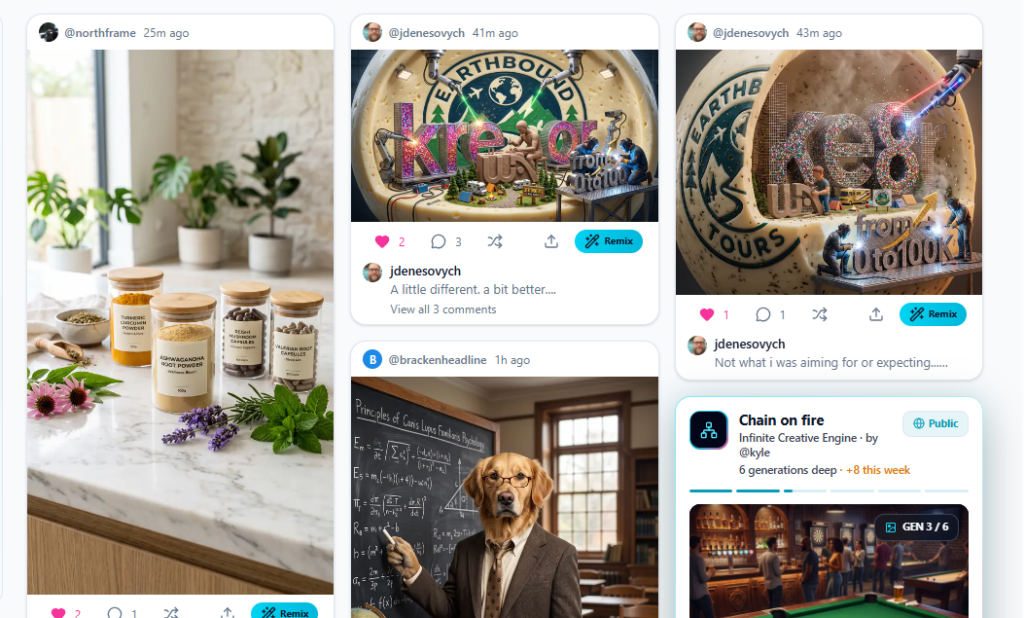
Kre8or isn’t just an AI image platform, it’s a community full of people just like you.
Your dashboard shows a real‑time feed of creations from other members, allowing you to browse new images, leave likes, write comments, and remix creations directly from the feed.
You can also follow creators, view their profiles, and explore all their work anytime.
The Social Feed
The social feed is the first thing you see each time you log in to Kre8or. It’s always available and updates in real time as members publish new creations.
On the social feed, you can:
- Browse new creations.
- Find trending images.
- Explore remixes.
- Like and comment on images.
- Connect with other creators.
- Support other members.
- See what the community is making.
The social feed is a great way to stay active and keep up to date with what’s happening on Kre8or.
Notifications & Activity
Kre8or keeps you informed of all activity related to your creations and interactions. You’ll also receive important system updates and challenge announcements.
You’ll get notified of things like:
- Likes on your images.
- Comments on your images.
- Remixes on your images.
- Reactions to your comments.
- Replies to your comments.
- System updates
- Challenge announcements
Keeping up with your notifications helps you stay informed and engaged. Check them regularly so you don’t miss anything.
The Importance Of The Community
The community is one of the most important parts of Kre8or. It brings members together, gives creators visibility, and provides a space for everyone to share their work.
The community is important because it:
- Supports creators.
- Gives creators visibility.
- Allows members to support each other.
The community is the heart of Kre8or, and it’s something all members should aim to be active in as much as possible.
How To Stay Active In The Community
When you first join Kre8or, getting involved can feel overwhelming. But you don’t need to do anything complicated. A few small actions each day is all it takes.
Here are some simple tips to stay active in the community:
- Browse the feed daily.
- Like creations you enjoy.
- Comment on your favourite creations.
- Remix images that inspire you.
- Participate in challenges.
- Stay active and consistent.
Staying active helps you build your community presence and connect with other creative people. The best way to grow on Kre8or is by being involved.
Get Involved & Have Fun
The Kre8or community is one of the best parts of the platform, and staying active each day goes a long way.
Get involved, interact with images, follow creators you like, and have fun. Never be afraid to share your thoughts or support someone’s work.
The community is warm, positive, and welcoming. Your feedback makes creators happy and helps them improve their work.
Take advantage of the community and keep being creative at the same time.
Now that you understand how the community and social features can help you, let’s take a look at the Kre8or affiliate program so you can boost your earnings even further.
Affiliate Program
Kre8or has an affiliate program that is free for all members. When you join the platform, you’re automatically part of the affiliate program.
You can refer members to Kre8or by sharing your affiliate link anywhere online.
You can also get referrals by sharing images directly to social media, through email, or on your website.
Your affiliate link is embedded whenever you click the Share button, and if someone signs up through an image you shared, you’ll receive the referral.
Earnings & Payouts
You’ll find your affiliate link at the top right corner of the Earn page. You can copy and paste it anywhere you need, and you can add tracking tags to the end of your link if you want to monitor your promotions.
When someone joins through your affiliate link, you earn 10% lifetime commissions for as long as they remain a member.
You can cash out your earnings anytime once you reach at least $25. Payment options include PayPal, Payoneer, Venmo, Amazon gift cards, bank transfer, and more.
Payout times vary depending on the method you choose. Some are instant, while others can take up to 3 business days.
Benefits Of The Affiliate Program
The Kre8or affiliate program is a simple way to earn extra cash.
Benefits include:
- Easy way to earn extra income
- No experience required
- Works alongside your challenge and remix earnings
- Great for bloggers, reviewers, and content creators
Anyone can profit from the affiliate program, but make sure your promotions are honest and ethical.
Boost Your Income
The Kre8or affiliate program is an easy way to boost your income. You’re sharing a useful platform and being rewarded at the same time.
If you enjoy Kre8or, you should take advantage of the affiliate program. You never know where it could take you.
Anyone can earn by sharing Kre8or, not just by creating images. It’s a great opportunity for creators, bloggers, marketers, and anyone looking to earn money by sharing their work.
Now that you understand how the affiliate program works, let’s take a look at how much Kre8or costs and what you get as a member.
Kre8or Pricing
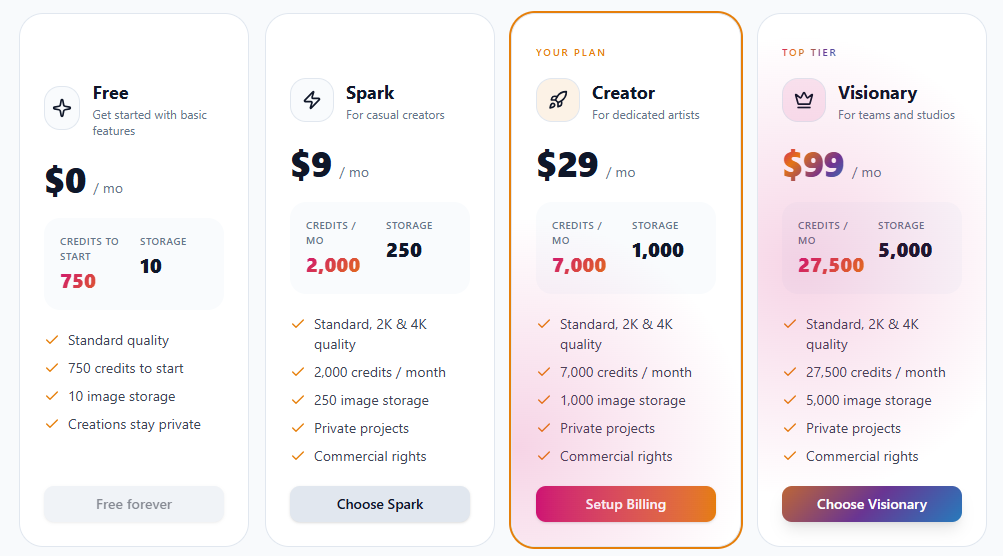
Kre8or offers several membership levels designed for different types of creators, along with the ability to build custom plans.
Here’s a breakdown of each plan and what you get as a member:
Free
The free membership is designed to let anyone try Kre8or before committing.
As a free member, you can create 10 images, but you can’t keep them private.
Although limited, the purpose of the free membership is simply to help you test the platform and get a feel for how it works.
If you want to continue creating images, you’ll need to upgrade.
Spark
Spark costs $9 per month and is designed for casual users who want to experiment with the platform at a low cost.
As a Spark member, you’ll get 2,000 credits per month, 250 image storage, the ability to keep your images private, and commercial rights to everything you create.
Spark is best for light users who want to explore the platform but don’t plan to use it regularly.
Creator
Creator costs $29 per month and is designed for dedicated artists who want to create daily.
As a creator member, you’ll get 7,000 credits per month, 1,000 image storage, the ability to keep your images private, and commercial rights to everything you create.
Creator is best for those who want to create consistently, earn from their work, and grow their business at the same time.
Visionary
Visionary costs $99 per month and is designed for power users, teams and studios. At this level, you can create a large number of images and take your workflow to the next level.
As a Visionary member, you’ll get 27,500 credits per month, 3,000 image storage, the ability to keep your images private, and commercial rights to everything you create.
You’ll also have the ability to host community challenges.
Visionary is best for serious creators who need a high volume of images and advanced features.
Custom Plans
Kre8or also allows you to build your own custom plan with up to 200,000 credits per month. You can add additional image storage for up to 25,000 images.
You’ll get all the inclusions of visionary, plus the extra credits and image storage you choose.
The cost varies depending on how many credits and how much image storage you add.
Custom plans can cost hundreds of dollars, so they’re best suited for high‑level users who need more than what the top tier offers.
Monthly Vs Yearly Membership
Kre8or offers monthly and yearly options for Spark, Creator, Visionary, and custom plans. The free membership will always remain free.
If you choose a yearly membership, you’ll save 20%, which is like getting two months for free.
So, if you like Kre8or, and are committed to it long-term, a yearly membership is a really good option to consider.
Which Membership Level Should You Choose?
The membership level you choose depends on your goals and how often you plan to create.
- Free is great for testing the platform.
- Spark is best for casual users.
- Creator is ideal for those who want to create consistently and need more credits and storage.
- Visionary is best for experienced creators, teams, and anyone who needs to produce a large number of images.
You can upgrade or downgrade anytime, which makes the platform very flexible.
Overall, Kre8or offers some great membership options that are affordable, flexible, and packed with value.
In my experience, Creator offers the best balance of cost and features for most people starting out, while Visionary and custom plans are ideal for those who need the extra power they provide.
Now that you know how much Kre8or costs and what each membership level gives you, let’s take a look at if Kre8or is actually worth joining.
Is Kre8or Worth Joining?
Kre8or is a great platform that allows anyone to create stunning images, regardless of their design experience.
It provides everything it promises for a reasonable price. The higher‑level memberships and custom plans can be expensive, but they still offer strong value for creators who need more power.
Kre8or has a strong community, fast image generation, a remix system, multiple ways to earn money, and plenty of features that make the platform enjoyable and rewarding.
The free plan is very limited, credits can run out fast, and some challenges can be tough. However, if you are creative and patient, you shouldn’t have any issues.
In my experience, Kre8or is absolutely worth joining if you enjoy creating images and want a platform that rewards creativity.
If you stay active, participate in challenges, and experiment, Kre8or becomes a fun and rewarding platform.
Conclusion
In conclusion, Kre8or is an AI image generation platform that allows anyone to create high-quality visuals. It’s beginner-friendly, flexible, and doesn’t require any design experience.
Kre8or has fast image generation, a strong community, multiple earning methods, flexible pricing, and plenty of features that make the platform enjoyable and rewarding.
The free plan is limited and credits can run out quickly, but the platform still provides excellent value and plenty of ways to grow, experiment, and earn.
In my experience, Kre8or is absolutely worth joining if you enjoy creating images and want to earn from your creativity.
Whether you’re a beginner or an experienced creator, Kre8or gives you the tools to express yourself, grow your skills, and earn from your creativity.
So, if you’re ready to start creating, experimenting, and having fun, Kre8or is a great place to begin.
Thank you for reading. Have you ever tried Kre8or? If so, what kind of designs did you create? Let me know in the comments below.
If you’d like to try Kre8or for yourself, you can sign up for free here.